
01 / 03
Each item passed or failed, with the reason
Mark each item in the words the owner picks, such as Pass and Fail or Serviceable and Unserviceable. A defect goes on the item it's wrong with, with up to six photos, not into a notes field.
- Works with no signal on site, sign-off included
- Checks by anyone appear on every device
Details3 checked
Search this list
🪜 Extension ladderS/N SAMPLE-0107
PassFailNot applicable+ Add a defect
🔌 Extension lead, 20 m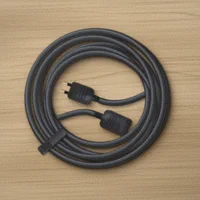
PassFailNot applicable+ Add a defect
MajorOuter sheath cut near the plug
⛑️ Safety helmetUnit 1
PassFailNot applicable+ Add a defect
🧗 Safety harnessUnit 1
PassFailNot applicable
Complete (1 not checked)
Details3 checked
Search this list
🪜 Extension ladderS/N SAMPLE-0107
PassFailNot applicable+ Add a defect
🔌 Extension lead, 20 m
PassFailNot applicable+ Add a defect
MajorOuter sheath cut near the plug
⛑️ Safety helmetUnit 1
PassFailNot applicable+ Add a defect
🧗 Safety harnessUnit 1
PassFailNot applicable
Complete (1 not checked)
Add a defect
ObservationMinorMajorCritical
What's wrong with it?Outer sheath cut near the plug
Photos (1)
Add anotherGallery
CancelAdd